Space Game
endless runner
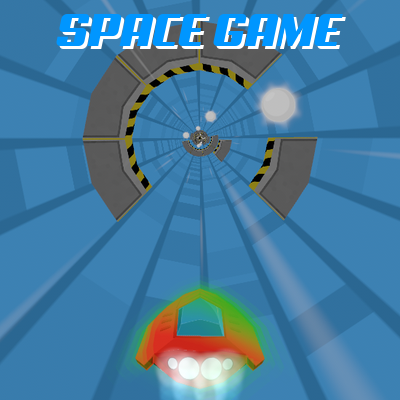
You fly a speeder through an endless tube that keeps getting faster. Dodge the walls, collect the orbs, and every 500 points the speed goes up.
Play Space GameHow to play
Hold your finger or the mouse where you want the ship to go around the tube, and it flies there. Or use the left and right arrows, or A and D. Green shield: walls cannot stop you. Hourglass: everything slows down. Esc pauses.
How it works
You pilot a speeder along the inside of an endless tube. It flies forward on its own and never stops: your only job is to steer, rotating around the tube to the left or right. The run ends the first time you hit a wall.
The tube is built from rings, or sections, that keep coming at you. Each has eight positions around the tube. Up to seven can be blocked by a wall, never all eight, so there is always a way through, and every section is turned to a random angle.
- Hold a finger, or the left mouse button, where you want to be. The speeder turns towards that point around the tube and settles there, so you aim at the gap rather than thinking about which way to spin. Press near the middle of the screen and it stops turning instead: the centre is a dead zone. Let go and the turn fades out rather than stopping dead.
- Left and right arrows, or A and D, rotate you around the tube. The turn builds up over a fraction of a second, and at full lock a lap takes a little over a second. A key press takes over from the pointer, and the next press on screen takes it back.
- Esc, or the pause button on screen, pauses. From there you can resume, restart, go to the menu, or switch sound and music on and off.
- On the game over screen, Space starts a new run and Esc returns to the menu.
Scoring and speed
Every section that does not hold a power-up carries one orb, worth 100 points. Nothing else scores. The screen shows your score, the distance travelled and your level, with a circle that fills towards the next one. Every 500 points, which is five orbs, the level goes up and the speeder accelerates to a higher speed. Your best score is saved in your browser.
Power-ups
About one section in fifty holds a green shield instead of walls, and about one in fifty an hourglass.
- Green shield: for ten seconds, walls cannot stop you.
- Hourglass: the whole game runs at half speed for five seconds of game time, about ten seconds on the clock. Walls, speeder and steering all slow down together.
Strategy that actually helps
Follow the orbs. In every section the orb sits in the one position that is never given a wall. If you can reach the orb, you are in the gap.
Point at the gap, not at the wall. Holding where you want to be does the turning for you, and the closer you are to that point the gentler the turn gets, so the speeder arrives without overshooting. On a keyboard the turn needs a moment to build up: a small correction started in time beats a full swing at the last moment, and short taps give short, precise moves.
Take the nearest gap. No gap is more than half a lap away, and going the short way leaves you time to line up for the next section.
Spend the shield collecting. For ten seconds you do not need to look for gaps, so aim for every orb in reach and bank progress towards the next level.
Steer for the hourglass. At half speed even the densest sections become readable.
Levels and starting points
The menu lets you start a run at level 1, 4, 8 or 12. Each opens once you have reached that level while playing, and is saved the moment you get there. A run started higher has the speed it would have had if you had played up to it.
Sections come closer together as the speed rises, until around level twelve. From there the spacing grows with the speed, so the rhythm of the walls stays the same while everything else keeps getting faster.
Continuing after a crash
When you play on Bananai, the game over screen may offer to continue in exchange for watching an ad. The offer lasts eight seconds and appears at most once per run. It is optional, and an ad is not always available: if there is none, the game says so and the run ends as normal. If you watch one to the end, you carry on from the level where you crashed, with your score intact.
Common questions
Is it free? Yes. It runs in your browser, with no signup and nothing to download.
Does it work on a phone? Yes. Hold a finger where you want the speeder to go and it flies there. It works in portrait and landscape, and on a tall, narrow screen the view widens so you still see the walls coming.
Does it pause by itself? Yes. Switch to another tab and the run pauses until you resume it.
What language is it in? The game's own text is in English, and there is very little of it.
More games

Also available in: Italiano