Malaga
space shooter
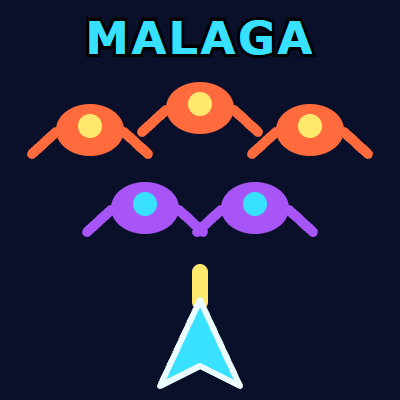
A vertical shooter whose formation never settles. The enemies do not arrive together: they come down staggered, each on its own delay, and once in place they keep swaying rather than sitting in neat rows, so the target you lined up drifts off by itself. They shoot back on their own schedule, with no pattern to memorise. The rows are worth different amounts, and the one that pays best is the one furthest away — the big score means punching a hole through the formation while the rest of it comes down on you.
Play MalagaHow to play
The goal is to wipe out the whole formation and move on to the next wave, which arrives one row deeper. You start with three lives. The formation is eight columns wide and three rows deep on level one, gaining a row per wave up to six. The rows cycle through three ship types, each worth a different score: fifty points for the first, eighty for the second, a hundred and fifty for the third — which is usually the one sitting at the back. You lose a life to an enemy shot and to a collision alike, and after a hit there is a brief spell of immunity to get yourself back into position. Three lost lives end the run, and your best score stays on the device. Every enemy fires on its own irregular timer, so there is no rhythm to learn — the safe habit is never to linger under the same column. Controls: on a keyboard ← and → move, Space, ↑ or W fire, P or Esc pauses, Enter resumes or replays. On touch, drag your finger to steer, and fire is automatic as long as you are holding on.
How it works
Your ship moves along the bottom of the screen and fires straight up. Enemy ships fly in from above, one after another rather than all at once, and each settles into its own place in a formation eight ships wide. Once there, they sway slowly from side to side and start shooting down at you. Destroy the whole formation and the next wave flies in. You have three lives, and the game goes on until they run out.
- Enemies only fire once they are in position. While they are still coming down they cannot shoot, but your shots can already hit them.
- Their shots fall straight down from wherever the enemy was when it fired. Every enemy fires on its own irregular timer, roughly once every two to six seconds.
- The formation keeps its rows. Once in place the enemies move only sideways, and they do not dive at you. What you have to dodge is their fire.
- Hold fire for a steady stream, about five shots a second. Each shot destroys one enemy.
- Getting hit costs a life. Your ship stays where it is and blinks for about two and a half seconds, and nothing can hurt it while it blinks.
- A cleared wave also clears the sky. Enemy shots still falling when the last enemy goes down disappear with it.
On a keyboard, A and D also move the ship and W also fires. With a mouse, hold the button and drag: the ship follows the pointer and fires by itself, as it does with a finger.
Waves and scoring
The three enemy types look different and sit in fixed rows. From the top, the first row is red, the second blue and the third purple, and from the fourth row down the same order starts again.
- red: 50 points
- blue: 80 points
- purple: 150 points
Level 1 has three rows, 24 ships worth 2,240 points in all. Each level adds a row until level 4, which has six rows and 48 ships worth 4,480 points, and every wave after that keeps those six rows. Points per enemy never change with the level. What does keep changing is the speed of enemy shots: they fall a little faster at every level, with no upper limit. Your best score is shown as BEST under the current one and kept in this browser.
Strategy that actually helps
Shoot them on the way in. An enemy still flying down to its place cannot fire, so every one you hit before it settles is one less gun for the rest of the wave. Start firing the moment a wave appears, instead of waiting for the formation to settle.
Sidestep, do not run. Enemy shots fall in straight vertical lines. A short move to one side is enough to let one pass, and a big move risks carrying you under the next.
Go for purple when you have the choice. Every enemy shoots at the same rate, whatever its colour, so a purple ship is exactly as dangerous as a red one and pays three times as much.
The waves get thinner as you win. Each enemy fires on its own, so the amount of fire coming down depends on how many are left. The first ships you destroy make the rest of the wave easier.
Common questions
Is it free? Yes. It runs in your browser, with no signup and nothing to download.
Does it work on a phone? Yes. Drag your finger to steer the ship, and it fires automatically for as long as your finger stays on the screen. It works in portrait and landscape.
Does it end? No. Every cleared wave raises the level and a new one arrives, until you lose your third life.
Can I pause? Press P or Esc, and Enter to carry on. The game also pauses by itself when you switch to another tab.
Can I install it? Yes. Bananai can be installed as an app from the browser, and a game you have already opened usually keeps working when the connection drops.
More games


Also available in: Italiano